Beautiful Boardroom, Bad Meetings: Acoustics, Lighting and Colour Sri Lankan Designers Overlook
By Kithnuwan Silva · Published
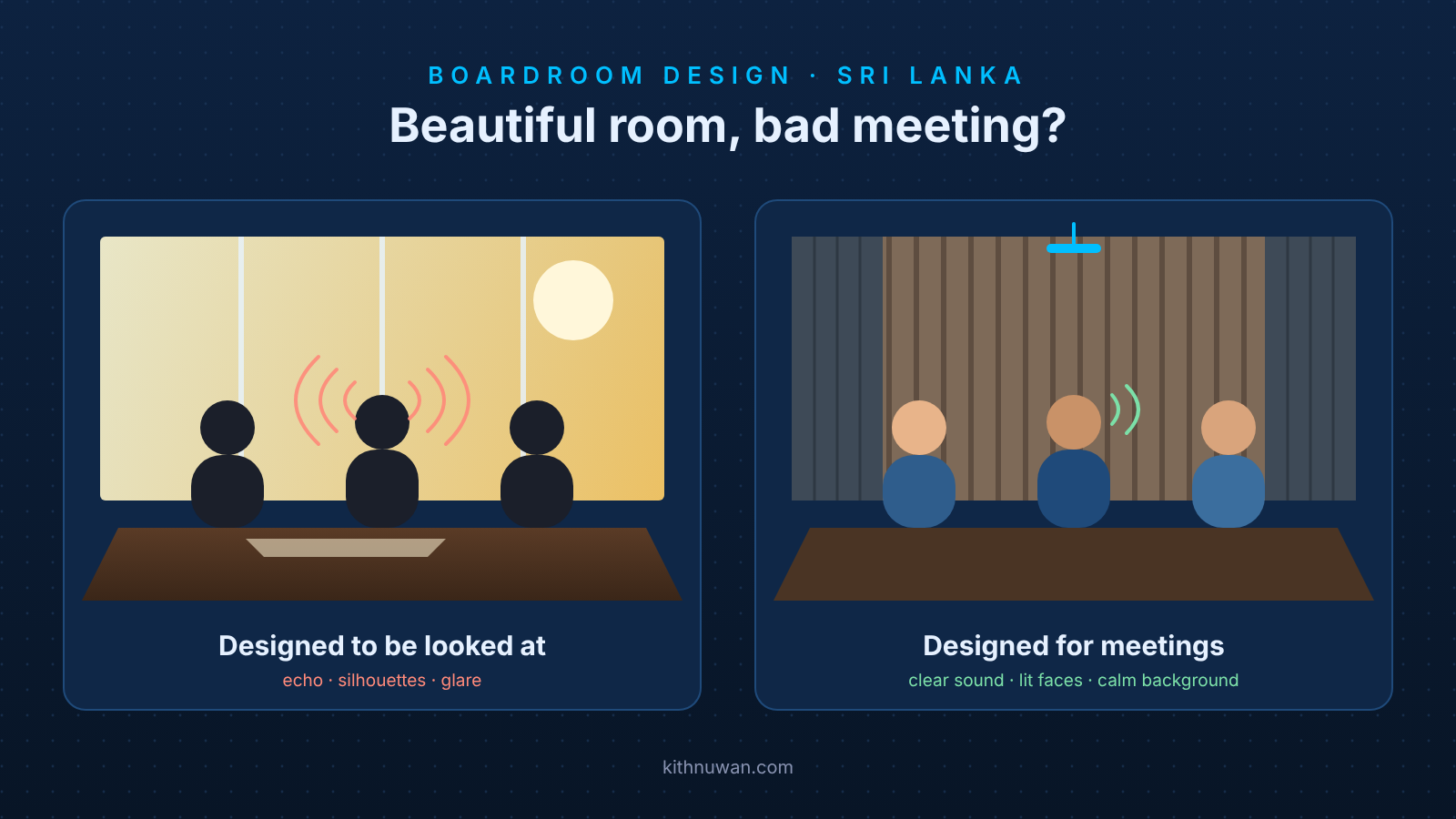
A boardroom can win design awards and still fail its first video call. Most boardrooms I'm called into in Colombo were designed to be looked at: full-height glass, a polished timber table, white walls and warm feature lighting. Then the first hybrid meeting starts, and the remote side hears an echo, sees silhouettes against the window, and asks everyone to repeat themselves.
None of that is a fault in the camera or the microphones. It's the room. Architects and interior designers in Sri Lanka do excellent work on appearance, but acoustics, lighting for cameras, wall colour and device placement are rarely on the drawing until the AV integrator arrives, and by then the glass is up and the ceiling is closed.
This post covers the five things that decide whether a beautiful boardroom also works, with the numbers designers can put in a specification.
Why do glass-walled boardrooms sound so bad?
Because glass, gypsum, stone and polished timber reflect almost all speech back into the room, so every word arrives at the microphone several times. Acousticians measure this as reverberation time (RT60): how many seconds a sound takes to fade by 60 dB after it stops.
Room type | Target RT60 |
|---|---|
Video collaboration and small conference rooms | 0.3–0.4 s |
Enclosed meeting rooms and boardrooms | 0.4–0.6 s |
Open-plan offices and collaboration zones | 0.6–0.8 s |
Untreated glass-walled meeting rooms often measure 0.8 to 1.2 seconds, up to three times the boardroom target. The far end suffers most: people in the room hear each other well enough, so the problem is often missed until a remote participant complains. The microphones pick up every reflection, and echo cancellation can only remove so much.
Noise matters too. Cisco suggests background noise of no more than 30 dB(A), and Crestron and Strive AV recommend a noise criterion of NC 25–30 for the air-conditioning. In Colombo, the usual offenders are fan-coil units and split air-conditioners above the table, and a door onto a busy corridor.
How do you fix the acoustics without losing the glass?
You add absorption where the eye doesn't land and keep the glass clear. A glass boardroom can look exactly as the designer intended and still sound right.
- Start with the ceiling. It is the largest surface and the easiest win. Specify acoustic ceiling tiles of absorption class A, or NRC 0.9 or higher, instead of a plain gypsum ceiling. A slatted timber or fabric ceiling with absorbent backing keeps the premium look.
- Treat at least two walls, preferably adjacent ones. Cisco suggests wall absorption of about half the ceiling area, and Strive AV recommends covering 15–25% of the total wall surface in enterprise rooms, spread across the height of seated heads. Treating only opposite walls leaves flutter echo between the others. Fabric-wrapped panels in the client's colours, timber slat walls with acoustic felt behind, and upholstered back walls all work.
- Use transparent absorbers where glass must stay. Micro-perforated transparent films and panels absorb sound while staying see-through.
- Let soft finishes help. Carpet or a large rug, upholstered chairs and floor-to-ceiling curtains on glass all lower reverberation. Curtains also solve the daylight problem below.
- Keep the noise out. Cisco suggests walls of about Rw 48 dB and doors of about Rw 35 dB for privacy and quiet. Choose quiet AC units and keep their outlets away from ceiling microphones.
Treat the room before the AV is tuned, not after. A common belief is that a good digital signal processor (DSP) can fix a bad room. It can't. DSP handles low-frequency boom well, but the mid-range reflections that smear speech need physical absorption. Crestron warns that a microphone signal clipped in a live room can't be repaired later in software, so the acoustic treatment should be finished before the integrator tunes echo cancellation.
A quick check anyone can do: stand in the middle of the room and clap once. If you hear a flutter, or a ring that lasts more than about half a second, the room is too reverberant for good echo cancellation.
How should a boardroom be lit for video?
Light the faces, not the table, and keep the window behind the camera rather than behind the people. Feature lighting that looks dramatic in person usually makes faces dark and patchy on camera.
What to specify | Target | Why |
|---|---|---|
Light on faces, measured vertically | 400–500 lux (Poly allows 323–592 lux) | The camera sees faces, not the table top. Most downlights put light on the table and leave eyes in shadow. |
Contrast between faces and surroundings | Below 1 : 1.5 (e.g. 500 lux faces, 750 lux table at most) | A bright table or wall makes the camera darken the whole picture, faces included. |
Colour temperature | About 4000 K, the same for every fitting | Mixed warm and cool fittings give people different skin tones on screen. |
Colour rendering | CRI 80 or higher | Skin tones and the client's brand colours look natural on camera. |
Fittings | Glare-free, light at about 45° towards faces | Lights the face from the front and above without dazzling the camera or the people. |
Daylight | Blinds or curtains that bring it down to a comfortable level | Sri Lankan sun through a glass wall behind the table turns every participant into a silhouette. |
Put the lights on separate circuits for meetings, video calls and presentations, and let the AV control panel recall each setting. A video call scene that dims the zone in front of the display and raises the face lighting fixes most rooms at the touch of a button.
Does wall colour really affect a meeting?
Yes, because the wall behind the people is the background of every video call. The camera adjusts its exposure to the whole picture, so the wall's brightness changes how the faces look.
- Avoid pure white walls behind seats. A bright white wall makes the camera expose for the wall, and the faces in front of it go dark. Cisco recommends neutral walls and tables with a light reflectance value (LRV) of about 50%: a mid-tone grey, greige, soft blue or warm neutral. If the client wants a light wall, an off-white such as cream or eggshell works better on camera than brilliant white.
- Avoid very dark or highly saturated walls too. A black or deep red wall behind people pushes the camera the other way, and saturated reds and yellows confuse the camera's automatic white balance and tint skin tones. Light grey with a hint of blue is a safe choice behind seats.
- Keep the background calm. Busy wallpaper, stripes and strong patterns distract on screen and can shimmer on video. Save pattern and texture for walls the camera doesn't see.
- Put the brand on the wall the camera sees, with care. A logo or brand colour panel behind the chairman works well on video if it is matte, evenly lit and not brighter than the faces.
- Choose matte finishes. Gloss paint, lacquered timber and polished stone tables reflect light into the camera and create hot spots. A matte or satin table finish also bounces softer light up onto faces.
- Keep enough contrast for people with low vision. BS 8300:2018 recommends a difference of at least 30 points of LRV between adjacent surfaces such as wall and floor, so a grey wall on a grey carpet needs a lighter or darker partner.
Where should cameras, microphones and displays go?
Decide the display wall before the table, because everything else lines up on it. Too many rooms put the screen on the only wall left after the furniture plan, and the camera ends up seeing half the table side-on.
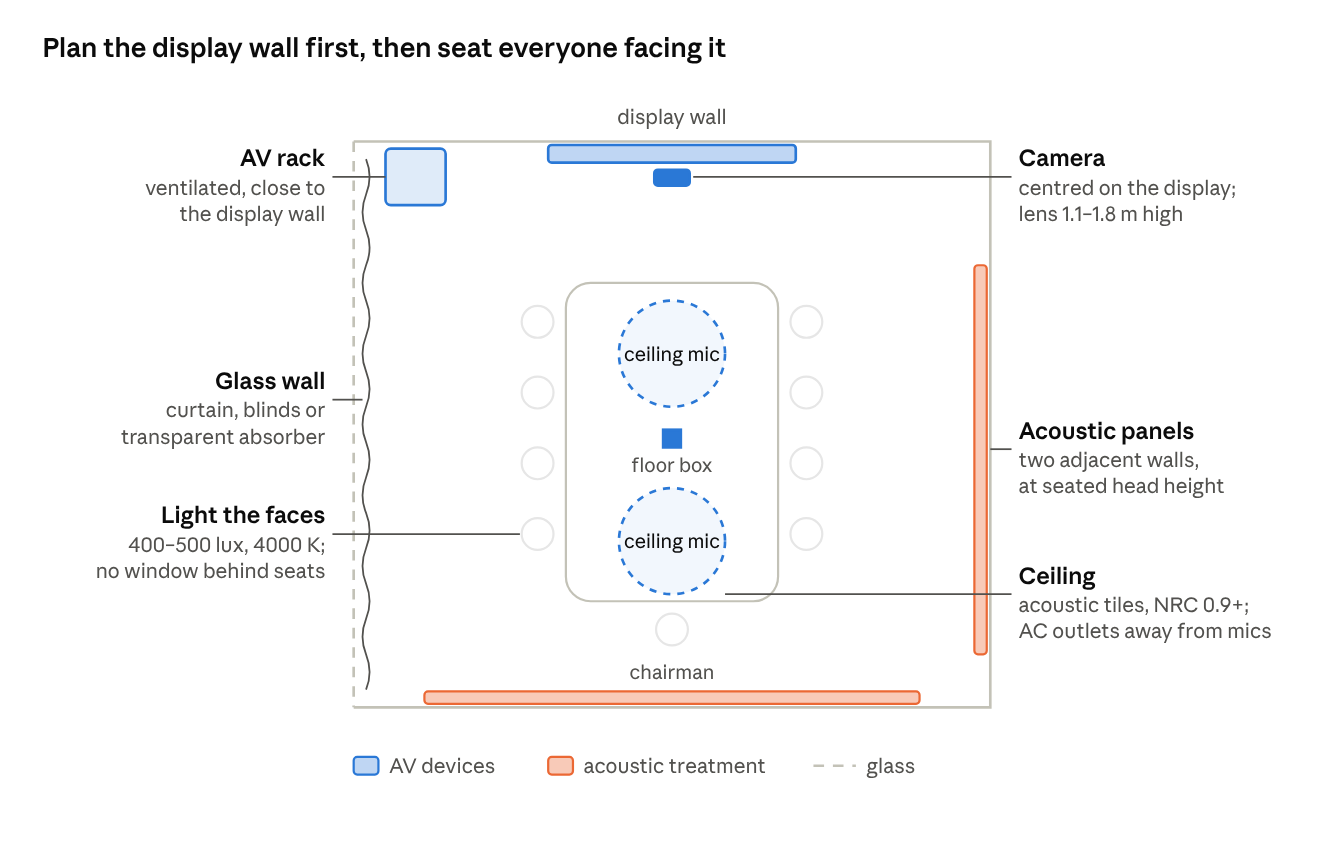
Boardroom plan · where the AV devices and acoustic treatment go
- Display and camera on one wall, facing the table. The camera sits centred above or below the display, as close as possible to the far-end image so people look at the camera when they look at the screen. Cisco suggests mounting the camera above screens under 80 inches and below larger ones, with the lens 1.1 to 1.8 m above the floor. The lower end, close to seated eye level at about 1.2 m, looks most natural; a camera near the ceiling looks down on people and hides their expressions.
- A table shape the camera can see. A U-shaped, curved or boat-shaped table opening towards the display keeps every face towards the camera, which a long narrow table can't. It also suits AI framing such as IntelliFrame on Teams Rooms Pro, which gives each person in the room their own video tile. Avoid seats with their backs to the camera.
- Ceiling microphones over the table, not over the door or the AC. Plan the ceiling grid, light fittings and AC diffusers around the microphone positions, not the other way round.
- Speakers near the display, so the remote voices come from where the faces are.
- Cable routes and a floor box under the table, laid before the floor finish, so laptops and table microphones connect without cables across the carpet.
A checklist for architects and interior designers
The cheapest time to get these right is on the drawing, before the glass and ceiling go in. Bring the AV integrator into the design stage, not the snagging stage, and finish the acoustic treatment before the AV system is tuned.
- ☐ Reverberation target written into the specification: 0.4–0.6 s for boardrooms, 0.3–0.4 s for rooms used mainly for video calls
- ☐ Acoustic ceiling (class A / NRC 0.9+) or an absorbent feature ceiling
- ☐ Absorption on at least two adjacent walls, at seated head height
- ☐ Curtains, blinds or transparent absorbers on glass walls
- ☐ Quiet AC (NC 25–30), with outlets away from where ceiling microphones will hang
- ☐ Walls about Rw 48 dB and doors about Rw 35 dB
- ☐ 400–500 lux on faces, 4000 K, CRI 80+, lighting on separate circuits
- ☐ No window directly behind the seats facing the camera
- ☐ Neutral, matte walls around LRV 50%; no pure white behind participants
- ☐ Display wall chosen first; table shape and seats arranged so everyone faces the camera
- ☐ Camera position, display size and mounting height agreed with the AV integrator
- ☐ Floor boxes and cable routes from the table to the AV rack before the floor is laid
- ☐ Power, network and backing for displays, cameras, ceiling microphones and speakers in the ceiling and walls
The best boardrooms are designed together
The most beautiful boardrooms I've worked on had one thing in common: the architect, the interior designer and the AV team sat at the same table from the first sketch. The glass stayed, the timber stayed, and the meetings worked.
Kithnuwan Silva is a Senior AV & Broadcast Systems Consultant and Head of System Integrations at Anscom Limited, with 20+ years designing boardrooms, auditoriums and broadcast systems across Sri Lanka. Architects and interior designers: bring me in at the design stage.
Sources
- Best practices for video-enabled rooms, Cisco Project Workplace: lighting, wall colour, camera height, RT60, absorption and sound insulation
- Reverberation time for different rooms, Commercial Acoustics: typical RT60 of glass-walled meeting rooms and conference-room targets
- Optimizing meeting room acoustics, Webex: RT60 of 0.3–0.4 s for video meeting rooms
- Guide to reverberation time, Resonics: RT60 targets by room type
- Room-design guidance from Crestron, Strive AV and Poly, and BS 8300:2018, from the author's research notes: acoustics before DSP tuning, 15–25% wall coverage, NC 25–30, 323–592 lux on faces, camera height and wall colour