Teams Rooms vs Zoom Rooms vs BYOD: Which Meeting Room Setup Suits Sri Lankan Organisations?
By Kithnuwan Silva · Published
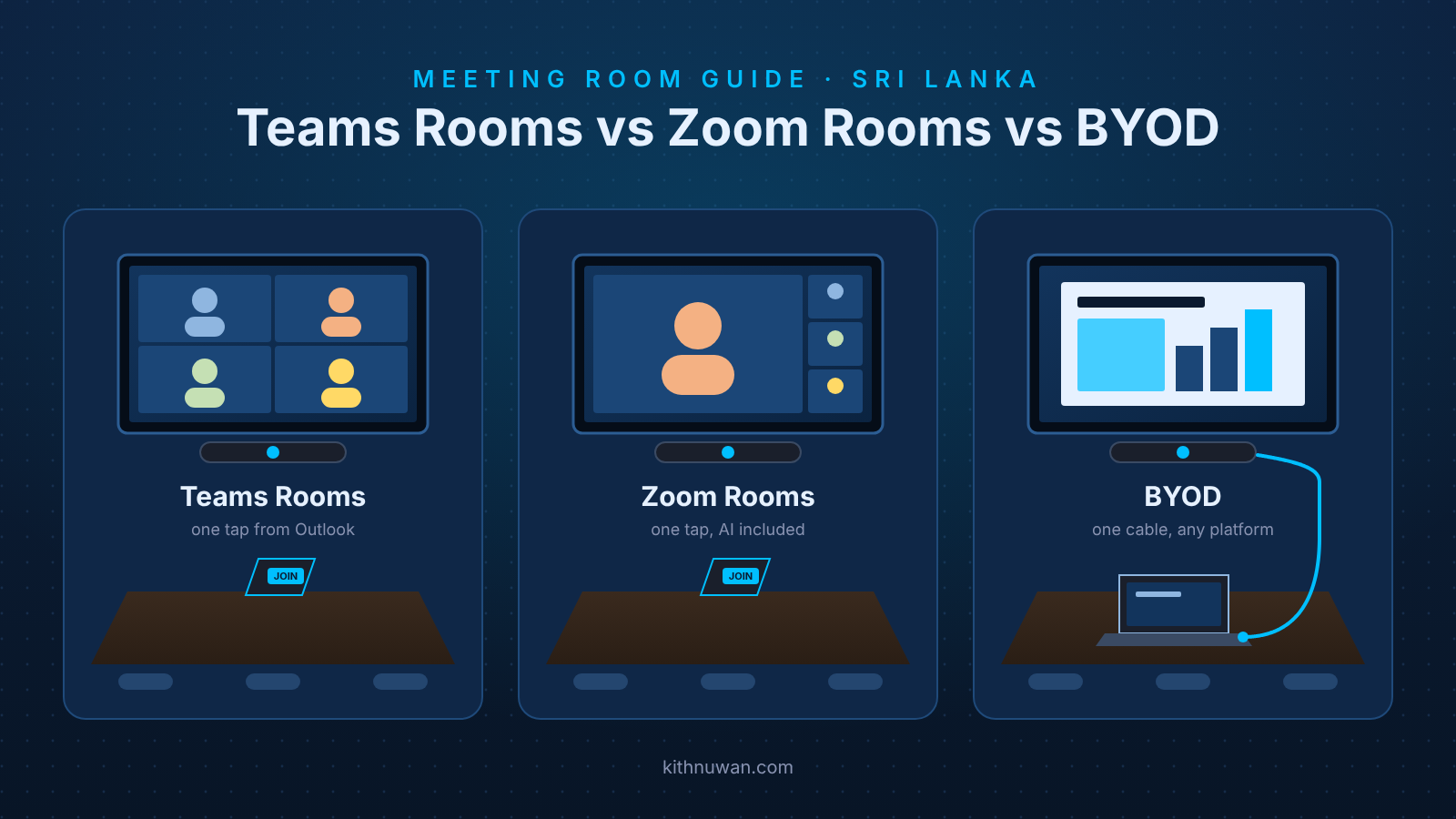
Short answer: for most Sri Lankan organisations already on Microsoft 365, Microsoft Teams Rooms is the right default for the main rooms, with BYOD in the small huddle rooms. Zoom Rooms makes sense when Zoom is genuinely the company's meeting platform, not just the one a few clients send invites on.
Almost every meeting room conversation I have with clients in Colombo starts with the same question: Teams, Zoom, or just a cable for the laptop? Over 20 years, and rooms for clients such as Unilever Sri Lanka, MAS and IWMI, I've seen each option succeed and each one fail. They usually fail because the room was chosen for the wrong reasons.
This guide compares the three options as they stand in late 2026: what each one is, what it costs in rupees, and which suits which kind of Sri Lankan organisation.
What is the difference between Teams Rooms, Zoom Rooms and BYOD?
The difference is who brings the meeting: the room, or the person walking into it. A Teams Room or Zoom Room has its own computer, licence and calendar, so the meeting starts from a touch panel on the table. A BYOD room only provides the camera, microphones and screen; the meeting runs on a laptop.
Microsoft Teams Rooms (MTR). A certified room system (Logitech, Poly, Yealink, Lenovo, Neat and others) signs in to Microsoft 365 as the room itself. Meetings booked in Outlook appear on the touch panel, and one tap joins. The display, camera and audio are always ready, and IT manages the room from Microsoft's portal.
Zoom Rooms. The same idea on Zoom's platform: a dedicated room system, a touch controller and the room's own Zoom licence. Calendars from Microsoft 365 or Google Workspace can be connected, and rooms are managed from the Zoom admin portal.
BYOD (bring your own device). The room has a USB camera and speakerphone, or a video bar, plus a display, connected to whoever's laptop is on the table by one USB-C cable or a wireless presentation dongle. The laptop runs Teams, Zoom, Webex or Google Meet, so any platform works, but every meeting depends on that laptop and the person using it.
How do Teams Rooms, Zoom Rooms and BYOD compare?
On licence cost Teams Rooms and Zoom Rooms are within about Rs. 7,000 a room a year of each other; the real differences are platform fit and management. Rupee figures use Rs. 332 to the US dollar (23 October 2026).
Microsoft Teams Rooms | Zoom Rooms | BYOD room | |
|---|---|---|---|
How a meeting starts | One tap on the room's touch panel | One tap on the room's controller | Plug in a laptop, pick the camera and mic in the app |
Room licence (list price) | Basic: free, up to 25 rooms per tenant. Pro: US$40/room/month, about Rs. 159,000/room/year | US$49/room/month, or about US$499/room/year on annual billing (about Rs. 166,000) | None |
Hardware | Certified room system + touch panel; the same Logitech, Poly and Yealink bars are often certified for both platforms | Certified room system + controller | USB video bar, or camera + speakerphone; lowest cost |
Calendar and booking | Native Outlook / Exchange room mailbox | Microsoft 365 or Google Workspace via a connector | Whatever the laptop owner uses |
Joining other platforms | Zoom and Webex via Direct Guest Join | Teams via Direct Guest Join; SIP/H.323 calling | Any platform the laptop can run |
Remote management | Pro Management Portal: alerts, remote settings, analytics need Pro | Zoom Device Management, included | None; problems are found when a meeting fails |
AI meeting features | Pro adds IntelliFrame and other in-room AI; Copilot is licensed separately | AI Companion included in the room licence | Whatever the user's own licence includes |
Best for | Organisations on Microsoft 365 | Organisations that run their meetings on Zoom | Huddle rooms, training rooms, mixed-platform guests |
The free Teams Rooms Basic licence now does less than it used to. Device management moved from the Teams admin center to the Pro Management Portal in September 2026, and on Basic that portal covers enrolment and automatic updates only. Health alerts, remote configuration and analytics need Pro, so I treat Pro as the real price for any room that matters.
Neither licence includes hardware, and hardware is usually the larger share of the cost. A small-room video bar is roughly US$1,500 to US$2,500; a full boardroom with ceiling microphones and dedicated compute runs US$10,000 to US$25,000 before local duties and installation.
What matters most for Sri Lankan organisations?
Five local factors decide most of my recommendations, and the platform's feature list is rarely one of them.
- Which platform your staff already use. Most large Sri Lankan enterprises I work with (banks, apparel groups, FMCG and multinationals) already pay for Microsoft 365, so Teams Rooms fits their calendars, sign-in and security from day one. That is why projects such as Unilever Sri Lanka's 23 rooms and MAS Intimates' 10 rooms were built as Teams Rooms.
- Licences are billed in US dollars. The rupee weakened from Rs. 309.99 to Rs. 336.66 per dollar in the first half of 2026 alone. Twenty Teams Rooms Pro licences cost US$9,600 a year, about Rs. 3.2 million at today's rate, so budget the renewal with a currency buffer. BYOD rooms carry no recurring licence at all.
- Your clients and partners use every platform. Government bodies, UN agencies and overseas buyers send Teams, Zoom, Webex and Google Meet invites. Direct Guest Join lets a Teams Room join Zoom and Webex meetings, and a Zoom Room join Teams meetings, at no extra cost. For anything else, I add a USB-C or HDMI input to every room so a laptop can take over the room's camera, microphones and screen.
- Power and network. Put the room system, touch panel and network switch on a UPS so a power dip doesn't reboot the room mid-meeting. Give rooms a wired, prioritised connection rather than shared office Wi-Fi.
- Local support and spares. Choose hardware with a local distributor, warranty service and spares in Colombo. A video bar waiting weeks for an overseas replacement means a dead boardroom.
Which option should a Sri Lankan organisation choose?
Most organisations end up with a mix: a room system where meetings matter most, and BYOD everywhere else. Three questions get you there.
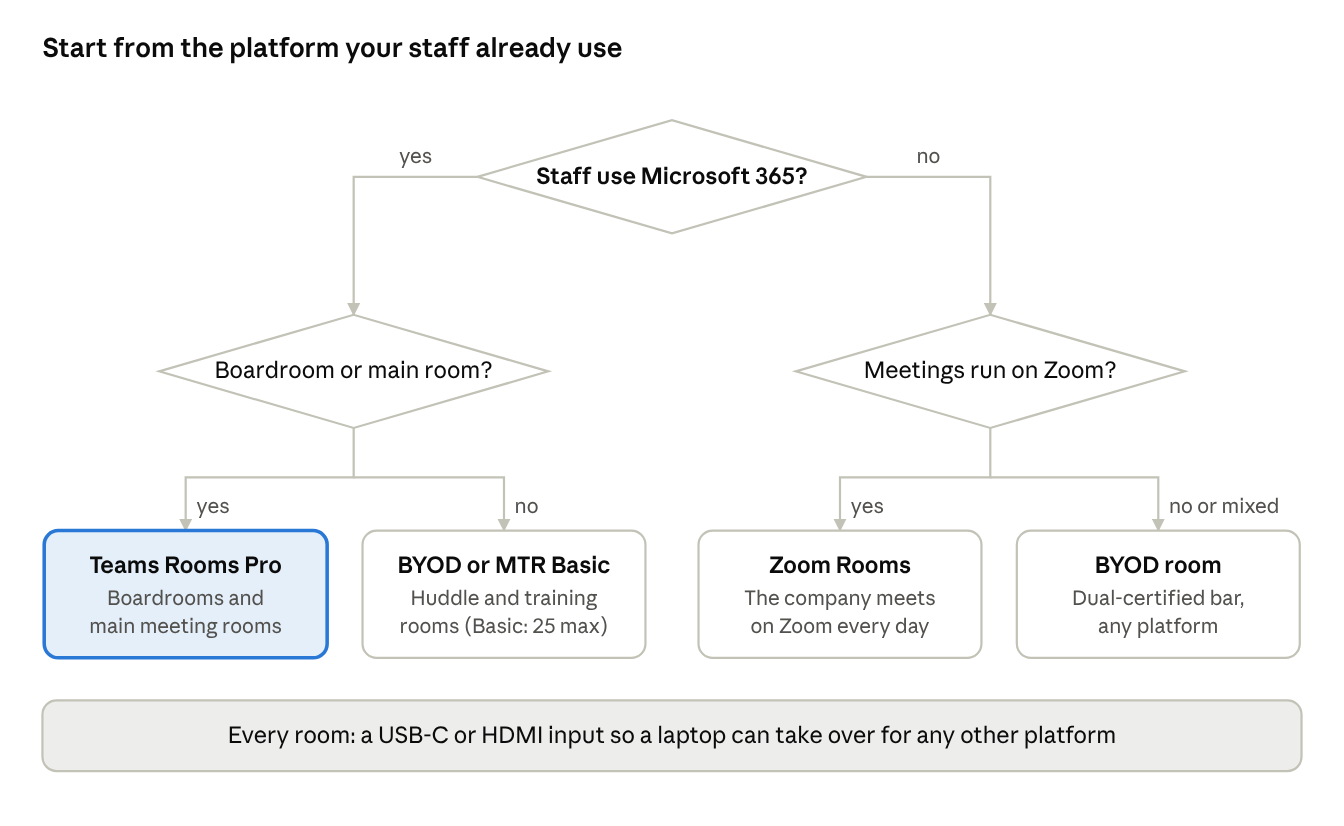
Choosing a meeting room setup · 3 questions, 4 outcomes
- Banks, finance, FMCG and multinationals on Microsoft 365: Teams Rooms Pro in the boardroom and main meeting rooms; BYOD or Teams Rooms Basic in huddle rooms.
- Apparel and export manufacturers: Teams Rooms where the group runs Microsoft 365, plus a laptop input in every buyer-facing room, because overseas buyers send invites on every platform.
- Companies that standardised on Zoom (common in BPO, IT services and start-ups): Zoom Rooms, with AI Companion included in the room licence.
- Government, universities and NGOs: BYOD rooms with dual-certified hardware, which keeps tenders platform-neutral and lets the room move to Teams Rooms or Zoom Rooms later.
Frequently asked questions
Can a Microsoft Teams Room join a Zoom meeting?
Yes. With Direct Guest Join enabled, a Teams Room can join Zoom and Webex meetings with one tap when the invite is sent or forwarded to the room. It joins as a guest, so some features, such as sharing content from the room, can be more limited than in a native meeting.
Is the free Teams Rooms Basic licence enough?
For up to 25 small rooms that only need to join meetings, yes. Basic gives meetings, scheduling and automatic updates, but no health alerts, remote configuration or analytics. Any boardroom or room you can't afford to have fail should be on Pro.
Is BYOD cheaper than a Teams Room or Zoom Room?
Yes, in both hardware and running cost, because a BYOD room has no room computer and no annual room licence. The trade-off is reliability: every meeting depends on the presenter's laptop, drivers and settings, and meetings start a few minutes late more often.
Can I switch from Zoom Rooms to Teams Rooms later?
Often, yes. Many video bars from Logitech, Poly and Yealink are certified for both platforms and can be switched with a software change, so choosing dual-certified hardware protects the investment.
Which option is best for a government office in Sri Lanka?
A BYOD-capable room with dual-certified hardware is the safest choice when meetings come from many platforms or the tender must stay platform-neutral. If the office has standardised on Microsoft 365, add Teams Rooms to the main conference rooms.
The bottom line
Pick the platform your people already live in, and put the money where meetings matter most. For most Sri Lankan enterprises that means Teams Rooms Pro in boardrooms and main meeting rooms, BYOD in huddle and training rooms, and a laptop input in every room for the invites that come from somewhere else.
Kithnuwan Silva is a Senior AV & Broadcast Systems Consultant and Head of System Integrations at Anscom Limited, with 20+ years designing meeting rooms, auditoriums and broadcast systems across Sri Lanka. Planning a meeting room? Get in touch.
Sources
- Teams Rooms Pro licence cost and the September 2026 portal change, Meeting Room 365, September 2026
- What does a smart meeting room actually cost to run in 2026?, UC Today, 9 June 2026
- Zoom Rooms vs Microsoft Teams Rooms: specifier guide, Restrepo Innovations, 6 May 2026
- Zoom Rooms interoperability guide, Zoom
- Sri Lanka rupee depreciates 7.9% in H1 2026, EconomyNext via Ground News
- Sri Lankan rupees to US dollar spot rate (DEXSLUS), Federal Reserve Bank of St. Louis, 23 October 2026