AV Project Design: Why Proper Engineering Matters Before Installation
By Kithnuwan Silva · Published
When a meeting room doesn't work, people usually blame the equipment. The microphone "isn't good enough", the display "is too small", the video conference "keeps cutting out".
In most cases, the equipment is fine. The problem was decided months earlier — when nobody asked how far the back row sits from the screen, what the glass wall would do to the sound, or whether there was a conduit to the table before the ceiling was closed.
AV problems are rarely installed in. They are designed in — or more accurately, they happen because the design step was skipped.
This article explains why proper AV engineering before installation matters, what a good AV design actually covers, and the questions you should ask any integrator before you sign a purchase order.
The real cost of "just install it"
A lot of AV projects in Sri Lanka still start with a product list: a display, a camera, a soundbar, maybe a wireless presentation box. The equipment is bought, the installer arrives, and the room is "done" in a day or two.
That approach looks cheaper. It usually isn't.
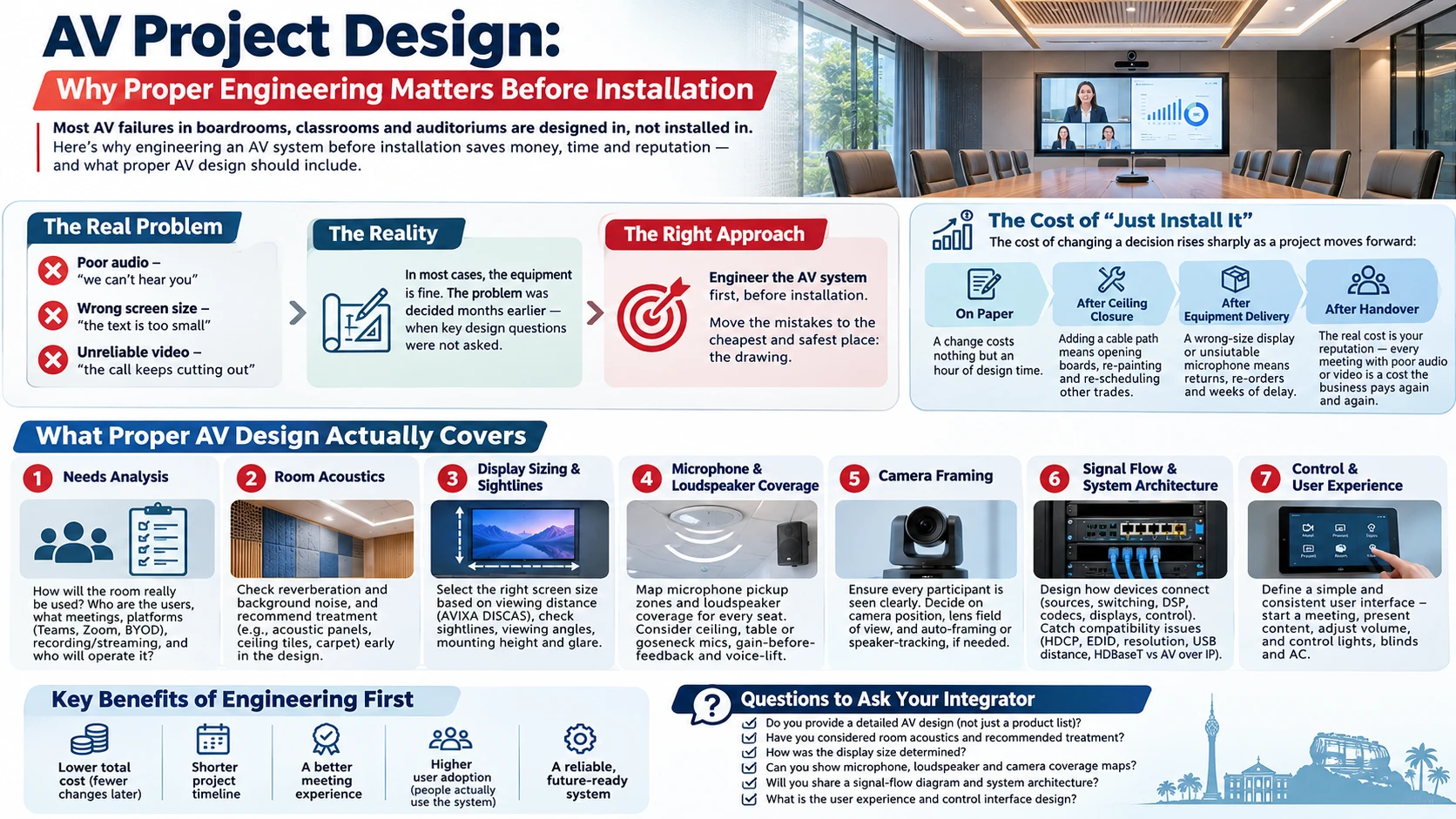
The cost of changing a decision rises sharply as a project moves forward:
- On paper, moving a microphone or resizing a screen costs nothing but an hour of design time.
- After the false ceiling is closed, adding a cable path means opening boards, re-painting and re-scheduling other trades.
- After the equipment is delivered, a wrong-size display or an unsuitable microphone means returns, re-orders and weeks of delay.
- After handover, the cost is your reputation — every meeting where the remote side says "sorry, we can't hear you" is a cost the business pays again and again.
Engineering the system first moves the mistakes to the cheapest possible place: the drawing.
What proper AV design actually covers
Good AV design is not a brochure and a price list. It is an engineering process that answers specific questions before a single cable is pulled.
1. Needs analysis — how will the room really be used?
Everything starts with users, not products. Who uses the room, how many people, and for what? A boardroom that runs hybrid board meetings on Microsoft Teams has very different needs from a training room that mostly runs presentations, or a divisible hall that becomes two rooms on weekdays and one on weekends.
Key questions include the conferencing platform (Teams Rooms, Zoom Rooms or BYOD), the content sources, whether sessions are recorded or streamed, and who will operate the system — a trained technician or whoever walks in first.
2. Room acoustics
Acoustics is the most ignored part of AV design and the most common reason a room "sounds bad".
Glass walls, tiled floors, bare concrete ceilings and large tables all reflect sound. The result is a long reverberation time, which makes speech muddy in the room and almost unintelligible for remote participants. No microphone or DSP can fully fix a room that is acoustically wrong.
A proper design checks reverberation and background noise (air-conditioning is a frequent culprit) and recommends treatment — absorptive panels, ceiling tiles, carpet or soft furnishings — early enough for the interior designer to include it.
3. Display sizing and sightlines
"How big should the screen be?" has an engineering answer, not a guess. Display size depends on the distance to the farthest viewer and the type of content being shown. Reading a detailed spreadsheet needs a much larger image than watching a video.
The industry used to rely on the simple 4/6/8 rule (farthest viewer at roughly 4, 6 or 8 times the image height depending on how detailed the content is). Today AVIXA's DISCAS standard gives a more precise method based on the size of the smallest element viewers must read. Either way, the screen is sized for the back row, not the front.
Sightlines, viewing angles, mounting height and glare from windows or lighting are checked at the same time.
4. Microphone and loudspeaker coverage
Every seat needs to be heard clearly and hear clearly. Design means mapping microphone pickup zones and loudspeaker coverage over the actual seating layout — including the person at the far corner of a U-shaped table.
This is also where decisions like ceiling array microphones versus table or gooseneck microphones are made, where gain-before-feedback is checked, and where speech reinforcement or voice-lift is considered for larger rooms.
5. Camera framing
For video conferencing, the camera must see every participant at a usable size. That determines camera position, lens field of view, and whether auto-framing or speaker-tracking cameras are needed. A camera mounted in the wrong place produces a picture of the tops of people's heads — no matter how expensive it is.
6. Signal flow and system architecture
The system architecture shows how every device connects: sources, switching, extenders, DSP, codecs, displays and control. It is where compatibility issues are caught on paper — HDCP handshakes, EDID management, resolution and frame-rate mismatches, USB distance limits, and whether HDBaseT or AV-over-IP is the right transport.
A clear signal-flow diagram is also the document your technicians and the client's IT team will rely on for years after installation.
7. Control and user experience
The best-engineered system fails if users can't operate it. Design defines what the touch panel or button panel shows, what happens when someone presses "Start Meeting", and how a divisible room combines and separates. Simple, consistent user interfaces are the difference between a room people use and a room people avoid.
8. Infrastructure coordination
AV depends on other trades. Design produces the information the architect, electrical contractor, interior fit-out team and IT department need:
- conduit routes, floor boxes and back-boxes
- power points and dedicated circuits
- structural support for heavy displays, projectors and speakers
- rack location, ventilation and access
- network ports, PoE budgets, VLANs and firewall rules
When this information reaches other teams late, AV ends up compromising — running cables on the surface, mounting equipment where it fits instead of where it works.
9. Documentation
Finally, a proper design produces documents: drawings, a schematic, a detailed BOQ, cable schedules and a test and commissioning plan. These turn a design into something that can be priced fairly, installed consistently and maintained properly.
Where AV projects usually go wrong
Across boardrooms, classrooms, auditoriums and studios, the same failures appear again and again:
- Equipment bought before the design. The product list drives the room instead of the room driving the product list.
- Ceilings closed before AV is coordinated. Cable paths, speaker back-boxes and microphone mounts become afterthoughts.
- Glass and hard surfaces with no acoustic treatment. The room looks great in photos and sounds terrible on calls.
- IT not involved early. Network policies block the very traffic the AV system needs — multicast, conferencing ports or device management.
- Tender BOQs copied from brochures. Specifications that don't match the room lead to bids that are hard to compare and systems that don't fit the space.
- No commissioning or testing. The system is "switched on" rather than tuned, verified and documented.
Every one of these is a design problem, not an installation problem.
A design-first AV process
A well-run AV project follows a clear sequence:
- Discovery — site visit, stakeholder meetings and a written requirement.
- Concept design — the system approach, options and a budget estimate.
- Detailed design — drawings, coverage design, schematic and BOQ.
- Coordination — infrastructure requirements issued to the architect, MEP and IT teams.
- Procurement — equipment ordered against an approved design.
- Installation — carried out to drawings, not from memory.
- Commissioning and testing — DSP tuning, camera presets, control programming and a documented test sheet.
- Handover and training — as-built drawings, manuals and user training.
Skipping the first four steps doesn't remove the work. It simply moves it to the most expensive point in the project — on site, after the fact.
Is AV design worth paying for?
Design effort is typically a small fraction of the total project value. Compare that with the cost of re-opening a ceiling, replacing a display that is too small, adding acoustic treatment after the furniture is in, or living with a boardroom that executives quietly refuse to use.
Proper engineering also makes tendering fairer. When every bidder prices the same well-defined design, you compare like with like instead of comparing three completely different systems with three different price tags.
Questions to ask your AV integrator
Before you approve an AV project, ask:
- Have you visited the site and measured the room?
- How did you choose the display size?
- Can you show me the microphone and speaker coverage for this seating layout?
- What acoustic treatment does the room need, if any?
- Do you have a system schematic and signal-flow diagram?
- What do you need from our electrical, interior and IT teams — and by when?
- How will the system be tested and commissioned before handover?
- What documentation will we receive at the end?
If the answers are vague, the design hasn't been done yet.
Frequently asked questions
What is AV system design?
AV system design is the engineering process of planning an audio-visual system before installation. It covers user requirements, room acoustics, display sizing, microphone and speaker coverage, camera placement, signal flow, control, infrastructure coordination and documentation.
Why should AV design happen before construction is finished?
Because AV depends on cable paths, power, structural support, acoustics and network infrastructure. These are cheap to plan during construction and expensive to add after ceilings, walls and furniture are complete.
Can good equipment fix a badly designed room?
Only partly. Premium microphones, DSPs and cameras help, but they cannot fully overcome poor acoustics, wrong display sizing or bad camera positions. Design decides how well the equipment can perform.
Who should be involved in AV design?
The client's end users, the AV integrator, the architect or interior designer, the electrical/MEP contractor and the IT team. Early coordination between them prevents most on-site problems.
How long does AV design take?
It depends on scale. A single meeting room may take days; a multi-room building, auditorium or broadcast facility can take weeks. Either way, it is far shorter than the delays caused by rework on site.
Final thought
AV is not a box you buy. It is a system you engineer — around the room, the people and the way they work. Spending time on design before installation is what turns a list of equipment into a space that simply works, every time someone walks in.
If you are planning a boardroom, training room, auditorium, classroom or studio and want it engineered properly from day one, I'm happy to talk it through.
Kithnuwan — Head of Systems Integration, Anscom Limited