Understanding Centralised AV Control Systems: Crestron, Extron, Kramer and Q-SYS
By Kithnuwan Silva · Published
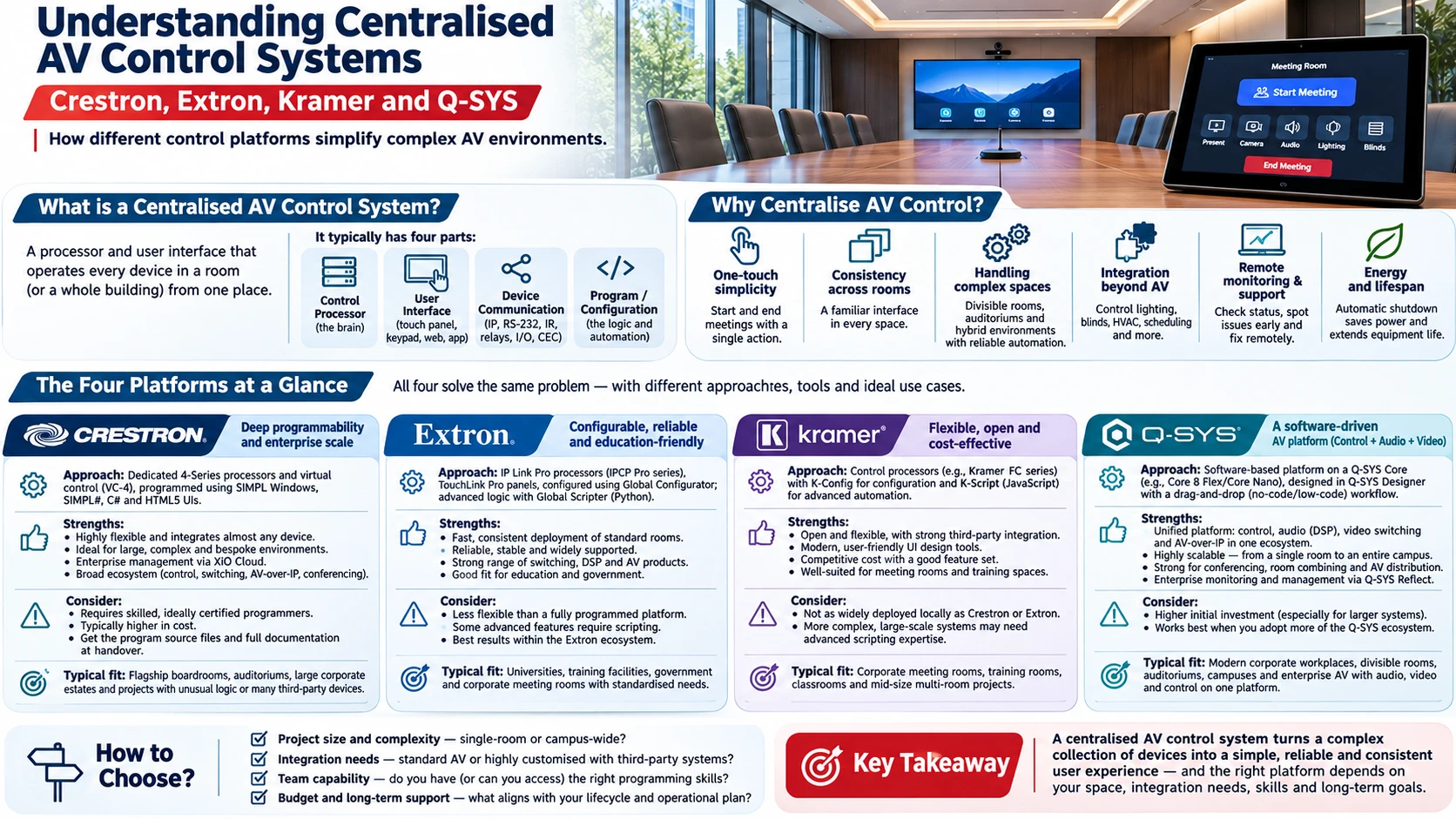
How different control platforms simplify complex AV environments.
Walk into a modern boardroom and you might find a display, a camera, ceiling microphones, a DSP, a video switcher, motorised blinds, lighting scenes and a conferencing system — each with its own remote, menu and settings.
Without a control system, using that room means knowing which remote turns on which device, which input to select, and why the sound is coming from the TV instead of the ceiling speakers. With a control system, it means pressing one button that says Start Meeting.
That is the job of centralised AV control: hiding complexity from users and putting it where it belongs — in the engineering.
This article explains what a centralised AV control system is, why it matters, and how four of the most widely used platforms — Crestron, Extron, Kramer and Q-SYS — approach the same problem in different ways.
What is a centralised AV control system?
A centralised AV control system is a processor and user interface that operates every device in a room (or a whole building) from one place.
It typically has four parts:
- The control processor — the "brain" that runs the logic. It may be a dedicated hardware box, part of a DSP core, or a virtual server.
- The user interface — touch panels, button panels, keypads, web pages or mobile apps.
- Device communication — the links to each device: IP (TCP/UDP, HTTP, Telnet), RS-232, IR, relays, digital I/O and sometimes HDMI-CEC.
- The program or configuration — the logic that decides what happens when someone presses a button: which display powers on, which input is routed, which camera preset is recalled, which microphones unmute.
The processor speaks each device's own language, so the user never has to.
Why centralise AV control?
One-touch simplicity
Users shouldn't need training to start a meeting. A good control system turns a 12-step sequence into a single, consistent action — and turns the room off properly at the end.
Consistency across rooms
When every meeting room in a building has the same interface, users move between them with confidence. This matters most in corporates, universities and government buildings with dozens of spaces.
Handling complex spaces
Divisible rooms, auditoriums, hybrid classrooms and broadcast-style environments involve routing, audio zoning, camera tracking and room combining. Control logic is what makes these behave correctly every time — for example, automatically re-routing audio and video when a partition wall opens.
Integration beyond AV
Control systems can also manage lighting, blinds, HVAC triggers, room scheduling panels and occupancy sensors, so the whole room responds as one system.
Remote monitoring and support
Enterprise control platforms report device status, errors and usage to a central dashboard. Support teams can see a projector lamp failing or a microphone going offline before users complain — and often fix issues remotely.
Energy and lifespan
Automatic shutdown of displays, projectors and amplifiers saves power and extends equipment life, especially in large estates where rooms are often left on.
The four platforms at a glance
Crestron, Extron, Kramer and Q-SYS all solve the same core problem. Where they differ is philosophy: how much is programmed versus configured, how tightly control is tied to their own hardware, and what kind of project each fits best.
Crestron — deep programmability and enterprise scale
Crestron is one of the best-known names in AV control and has long been the reference point for complex, highly customised systems.
Approach: Dedicated control processors (the 4-Series family) and a virtual control server option (VC-4), paired with Crestron touch panels and keypads. Systems are programmed rather than simply configured, using tools such as SIMPL Windows, SIMPL#, C# and HTML5-based user interfaces.
Strengths:
- Almost unlimited flexibility — if a device has a control protocol, it can usually be integrated.
- Strong at large, complex and bespoke environments: executive boardrooms, auditoriums, campuses and high-end residential.
- Enterprise device management and monitoring through Crestron's cloud platform (XiO Cloud).
- A broad ecosystem covering control, switching, AV-over-IP, conferencing and room scheduling.
Consider:
- Requires skilled, ideally certified programmers. Quality depends heavily on the programmer.
- Typically sits at the higher end of the budget range.
- Make sure you receive the program source files and documentation at handover — otherwise future changes depend on one person or company.
Typical fit: Flagship boardrooms, auditoriums, large corporate estates and projects with unusual logic or many third-party devices.
Extron — configurable, reliable and education-friendly
Extron is widely used in education, government and corporate environments, with a strong reputation for reliability and a large range of switching, signal-processing and control products.
Approach: IP Link Pro control processors (IPCP Pro series), TouchLink Pro touch panels and button panels. Many systems are configured rather than programmed using Global Configurator, which makes standard rooms quick to deploy. For advanced logic, Extron's Global Scripter uses Python.
Strengths:
- Fast, consistent deployment of standard rooms through configuration.
- Tight integration with Extron switchers, scalers, extenders and amplifiers.
- Enterprise monitoring and asset management through GlobalViewer Enterprise.
- Python scripting gives depth when a project needs it.
Consider:
- Best value when much of the signal chain is also Extron.
- Highly customised systems still need experienced programmers using Global Scripter.
Typical fit: University lecture theatres and classrooms, training rooms, government facilities and corporate rooms deployed at scale.
Kramer — cloud-based configuration and cost-effective scale
Kramer offers a broad AV range and takes a more software-led, accessible approach to control.
Approach: Kramer Control is a cloud-based platform where rooms are built through a drag-and-drop interface using a library of device drivers, then deployed to a Kramer control "Brain" (hardware or virtual). User interfaces can run on Kramer touch panels, tablets or other devices.
Strengths:
- Quick to design and deploy, with less specialised programming needed for typical rooms.
- Cost-effective for projects with many similar meeting rooms or classrooms.
- Cloud-based configuration makes remote updates and multi-site management easier.
- Works across Kramer and third-party devices through its driver library.
Consider:
- Very complex or unusual logic may be harder to achieve than on fully programmable platforms.
- Check that drivers exist for every device in your design before committing.
Typical fit: Corporate meeting rooms, huddle spaces, classrooms and multi-room rollouts where budget and simplicity matter.
Q-SYS — audio, video and control on one software platform
Q-SYS takes a different route. Rather than a separate control box, control runs on the same software-based Core processors that handle audio DSP and, increasingly, video and camera management.
Approach: Systems are designed in Q-SYS Designer software. The Core processor runs DSP, control logic and user interfaces (UCIs) on standard IT networking. Control can be built with ready-made plugins and block-based logic, or scripted in Lua for advanced functionality. Q-SYS touch screen controllers or web/mobile interfaces serve as the user panel.
Strengths:
- One platform for audio, control and conferencing — fewer boxes, fewer integration points.
- Built on standard network infrastructure, which makes it attractive to IT departments.
- Excellent where audio is central: divisible rooms, voice-lift, large conferencing spaces and multi-zone venues.
- Enterprise monitoring and management through Q-SYS Reflect.
- Scales from a single room to an entire building on the same design tools.
Consider:
- Most powerful when Q-SYS is also the audio DSP. Using it purely as a control processor in a non-Q-SYS system may not be the most efficient choice.
- Advanced Lua scripting still needs experienced engineers.
- Network design (QoS, VLANs, multicast) must be properly coordinated with IT.
Typical fit: Corporate conferencing, divisible rooms, hybrid classrooms, auditoriums and any project where DSP and control should live together.
Side-by-side comparison
Crestron | Extron | Kramer | Q-SYS | |
|---|---|---|---|---|
Core approach | Dedicated processors, fully programmed | Dedicated processors, configured or scripted | Cloud-configured control "Brain" | Software-based Core running DSP + control |
Programming / config | SIMPL Windows, SIMPL#, C#, HTML5 UI | Global Configurator, Global Scripter (Python) | Kramer Control (drag-and-drop, cloud) | Q-SYS Designer, plugins, block logic, Lua |
Main strength | Flexibility and complex logic | Reliability and fast standard deployments | Ease and cost-effective scale | Unified audio, control and conferencing on IT networks |
Enterprise monitoring | XiO Cloud | GlobalViewer Enterprise | Kramer cloud platform | Q-SYS Reflect |
Skill level needed | High | Low to high | Low to medium | Medium to high |
Typical fit | Flagship and bespoke spaces | Education, government, standardised rooms | Many simple rooms on a budget | Audio-centric and divisible spaces |
Product names and features change over time — always confirm the current product line and licensing with the manufacturer or your integrator.
How to choose the right platform
There is no single "best" control system. The right choice depends on the project.
- Room complexity. A simple huddle room and a divisible auditorium need very different levels of logic.
- Number of rooms. For large rollouts, standardisation, deployment speed and central management matter as much as features.
- The rest of the signal chain. If the DSP is Q-SYS, Q-SYS control is a natural fit. If switching and extension are Extron, Extron control integrates cleanly.
- Audio requirements. Audio-heavy spaces benefit from platforms where DSP and control are combined.
- IT environment. Consider network policies, security requirements and how the IT team wants to manage devices.
- Local support and programming skills. A platform is only as good as the people who program and support it. Make sure trained engineers are available locally for changes and support.
- Long-term ownership. Ask about licensing, software updates, warranty and — importantly — who owns the program files.
- Budget. Look at total cost of ownership, not only hardware price: programming time, licences, support and future changes.
Common mistakes with AV control projects
- Choosing a brand before defining requirements. The control platform should follow the room design, not lead it.
- No user interface specification. If nobody defines what each page and button does, the result depends on the programmer's assumptions.
- No device control list. Every device needs a confirmed control method (IP, RS-232, IR) and protocol before programming starts.
- Ignoring the network. Control traffic, VLANs and firewall rules must be agreed with IT early.
- No source code or documentation at handover. Without it, even a small change later can become expensive.
- Skipping testing. Every button, every scenario and every fault condition should be tested and signed off before handover.
Frequently asked questions
What does an AV control system do?
It lets users operate all the audio-visual devices in a room — displays, cameras, microphones, switchers, lighting and more — from one simple interface, usually a touch panel, while the processor handles the technical commands in the background.
Which is better: Crestron, Extron, Kramer or Q-SYS?
None is universally better. Crestron is strongest for complex, customised systems; Extron for reliable, standardised deployments; Kramer for cost-effective, easy-to-deploy rooms; and Q-SYS for projects where audio DSP, conferencing and control should run on one platform.
Do small meeting rooms need a control system?
Not always. Many small rooms using Microsoft Teams Rooms, Zoom Rooms or simple BYOD setups manage well with the conferencing system's own touch controller. A dedicated control system becomes valuable as the number of devices, rooms or use cases grows.
Can a control system manage lighting and blinds?
Yes. Most control platforms can trigger lighting scenes, blinds, screens and other building systems through IP, relays, contact closures or integration with building management systems.
Why should I ask for the program files at handover?
Because the program is what makes your system work. Owning the source files and documentation means any qualified integrator can support or modify the system later, instead of being locked to one person or company.
Final thought
A control system is the part of an AV installation users actually touch. Get it right and the technology becomes invisible — people simply walk in and start working. Get it wrong and even the best equipment feels unreliable.
Crestron, Extron, Kramer and Q-SYS are all proven platforms. The real difference comes from matching the right platform to the space, designing the user experience carefully, and having it programmed, tested and documented properly.
If you are planning a boardroom, classroom, auditorium or multi-room facility and want help choosing the right control approach, I'm happy to talk it through.
Kithnuwan — Head of Systems Integration, Anscom Limited